How digitally accessible is IDA really?
IDA is a trial setup for a digitally accessible chatbot. IDA stands for Inclusive Digital Assistant. The aim is to integrate IDA's technology into Gem, so that municipalities will soon be able to offer a chatbot that is digitally accessible too.
Over the past few months IDA has been independently assessed. After improvements were made, the trial setup was certified. IDA therefore meets the statutory minimum requirements for digital accessibility.
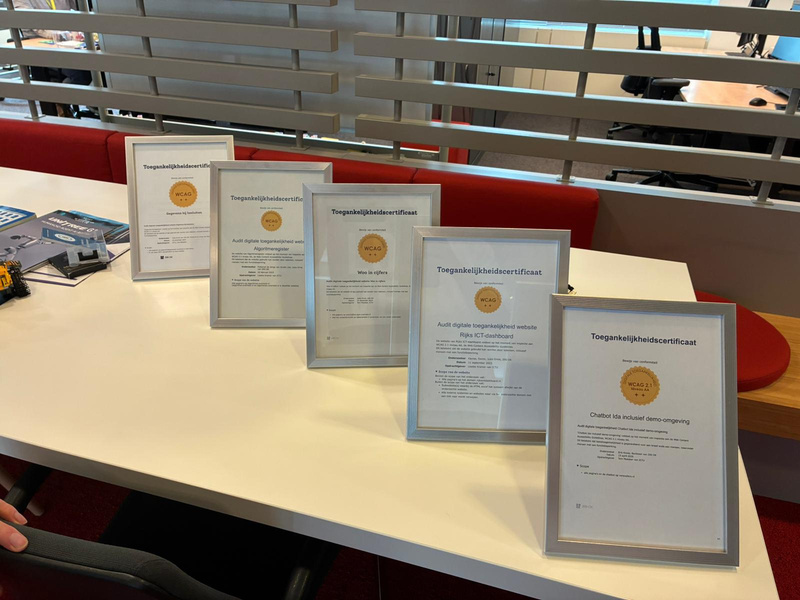
Certified digitally accessible
But a technically accessible chatbot is not automatically pleasant to use. That is why a panel of five people with a disability is currently testing IDA. We are incorporating the insights from these tests into a new version of IDA, one that fits the needs of people with a disability better still.
Why did the testers take part, and what stood out for them?
The first panel members took part because digital accessibility is not a ‘bonus’ for them, but a precondition for being able to use digital services independently. They use screen readers, or voice and head control, and wanted to draw on their own experience to contribute to a chatbot that works well for all residents.
They had questions about opening hours, passport applications and municipal schemes. One thing that stood out immediately was that IDA answers clearly and calmly. IDA also worked well with screen readers. Answers were read out in a logical order, which kept the information easy to follow. The interaction with the chatbot worked well too: asking and sending questions was straightforward and felt natural. An important verdict: according to the testers, IDA works more pleasantly than other chatbots they knew. Since the outcome of a test like this is always a little nerve-racking, that was very good to hear.
The testers certainly had points for improvement as well:
- After following the link to the chatbot, the chatbot still had to be opened separately. That was awkward.
- The image of Gem next to the answer was glaring at high contrast settings. That was distracting.
- The "enlarge" button does more than enlarge, but the name did not make that clear.
- Long answers would benefit from navigation options.
- It takes some searching on the website before you get to IDA; a keyboard shortcut would help.
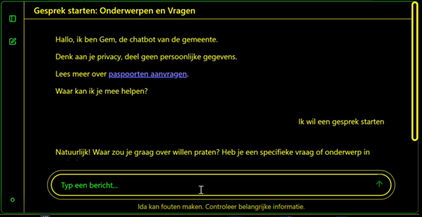
Less inspiring for most people, but this is how people with a (visual) disability see the chatbot.
What the testers appreciate most is that accessibility is being taken into account early in IDA's development. Their insights are helping us improve the chatbot step by step, for everyone.